Campaign URL Builder
Enter the Website URL and Campaign Information
Campaign Parameters
Generated URL
More Information and Examples for Each Parameter
| Parameter | Required | Example | Description |
|---|---|---|---|
|
Campaign ID
utm_id
|
No | abc.123 | Used to identify which ads campaign this referral references. Use utm_id to identify a specific ads campaign. |
|
Campaign Source
utm_source
|
Yes | Use utm_source to identify a search engine, newsletter name, or other source. | |
|
Campaign Medium
utm_medium
|
Yes | cpc | Use utm_medium to identify a medium such as email or cost-per-click. |
|
Campaign Name
utm_campaign
|
Yes | spring_sale | Used for keyword analysis. Use utm_campaign to identify a specific product promotion or strategic campaign. |
|
Campaign Term
utm_term
|
No | running+shoes | Used for paid search. Use utm_term to note the keywords for this ad. |
|
Campaign Content
utm_content
|
No | logolink | Used for A/B testing and content-targeted ads. Use utm_content to differentiate ads or links. |
What is a Campaign URL Builder?
A campaign URL builder is a tool that creates special tracking links for marketing campaigns. These links include UTM parameters, which are small tags added to a normal URL. A campaign url builder helps you add these tags without mistakes. Each tag sends campaign details to analytics tools. You can see where visitors come from and which channel they used. UTM parameters work directly with Google Analytics and similar platforms. They help group traffic by source, medium, and campaign name. This makes reports easy to understand. Marketers use a utm builder to keep tracking clean and structured. You get organized data instead of mixed traffic numbers. That leads to better attribution and smarter budget decisions. Tools from New SEO Tools make link tagging quick and simple for daily marketing work.
Key UTM Parameters Explained
UTM parameters are labels added to a link to track marketing traffic. A Google UTM Generator helps create these labels in the right format. Each parameter has a clear job.
- utm_source tells where the visitor came from. Examples are Google, Facebook, or a newsletter.
- utm_medium shows the marketing type. Examples are cpc, email, banner, or social.
- utm_campaign is the campaign label. It can be launch2026 or winter_offer. This groups all related links together.
- utm_term is optional. It is used for paid search keywords. You place the ad keyword here.
- utm_content is optional too. It separates similar links. For example, two ads in one campaign can use different content values.
Example Tagged Link:
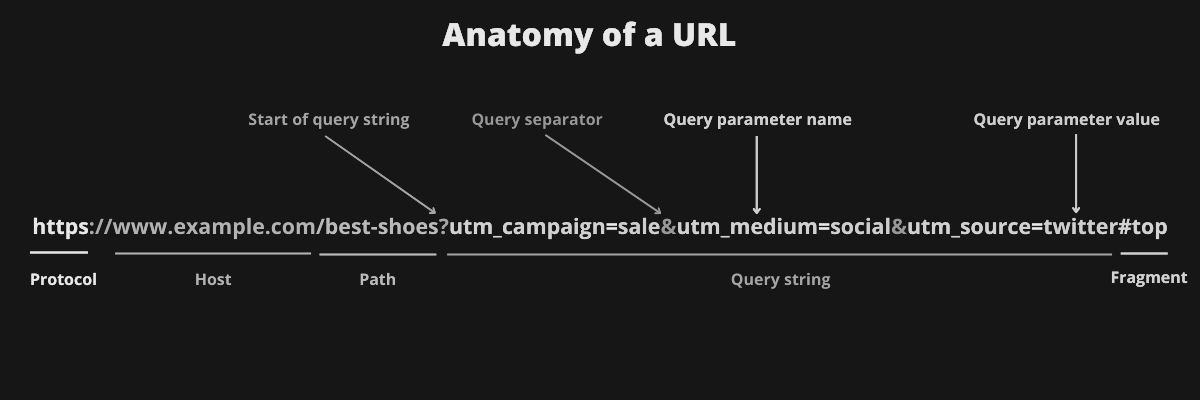
A utm builder places these values correctly in the URL. Clean structure means cleaner reports and better campaign analysis later.
How to Use a Google Campaign URL Builder?
- Open a Google campaign url builder or another trusted campaign url builder like New SEO Tools.
- Copy the final page URL you want to promote. This is your destination page.
- Paste the full link into the Website URL field. Include the correct protocol and path.
- Enter the campaign source. Add the platform name like google, linkedin, or email.
- Enter the campaign medium. Use values like cpc, social, or email.
- Type your campaign name. Make it short and descriptive, like promo_code or tool_launch.
- Fill in the campaign term if you run paid keyword ads. This step is optional.
- Fill in campaign content to split-test ads or buttons. This is optional too.
- Use lowercase text for every field. This keeps reports grouped correctly.
- Do not use spaces. Use hyphens instead of spaces between words.
- Keep the same naming style across all campaigns. Consistency is very important.
- Click generate in the Google UTM Generator Tool.
- Copy the final tagged link from the utm builder result box.
- Test the URL in a browser before using it in ads or emails.
Benefits of Using a UTM Builder Tool
A UTM builder tool removes manual tagging errors. You do not need to type parameters by hand. A Campaign URL Builder automatically adds the correct structure. This reduces broken or invalid links. It also keeps parameter order correct every time.
The tool saves time for marketing teams. You can create many tracked links in minutes. A Google UTM Generator also keeps the naming format consistent. That makes analytics reports easier to read. Clean tagging gives better campaign performance insights.
With a proper UTM Builder, you can measure which channels bring results. You can compare ads, emails, and social posts using real data. This supports data-driven decisions. It also helps prove marketing ROI to clients or managers. Teams can share tagged links and follow the same rules. That improves collaboration and reporting quality.
Using New SEO Tools for link tagging turns simple URLs into strong tracking assets for every campaign.