Why does your link preview still show the old image?
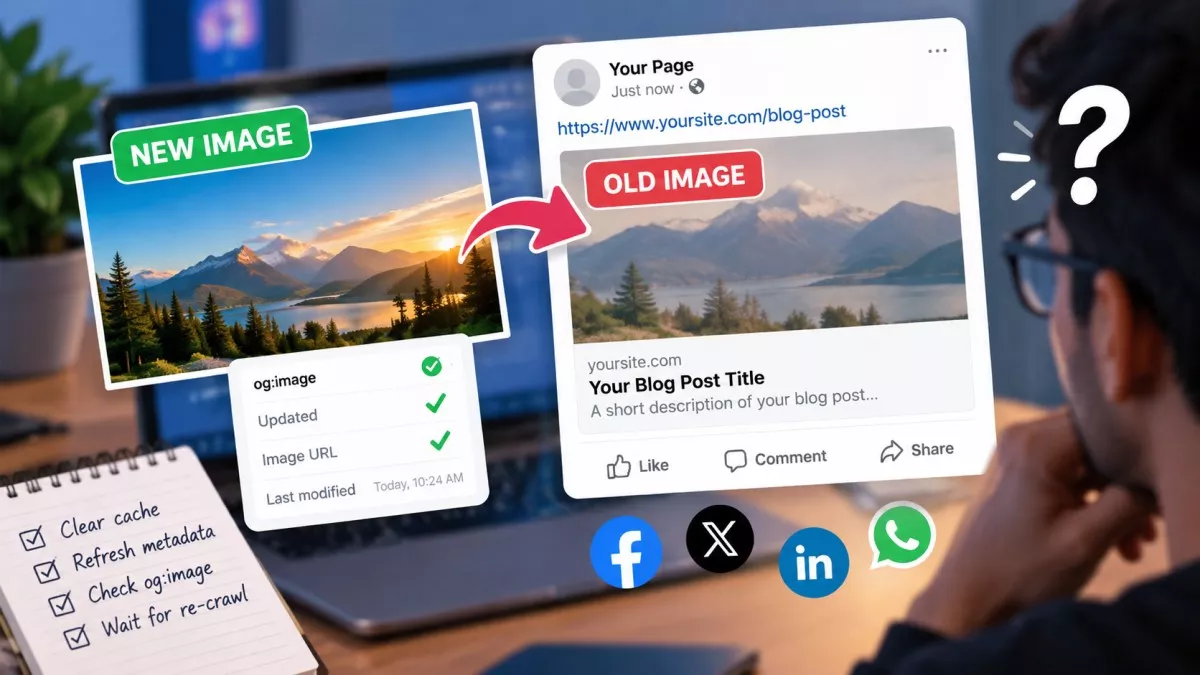
Your link preview still shows the old image because the platform cached it the first time someone shared the URL, and Facebook caches images by their URL rather than by your page. Replace the file at the same path and the crawler has no reason to fetch it again.
This is the part that makes the problem feel unfixable. You edit the tag, you hit Scrape Again, the debugger reports success, and the thumbnail in the group chat is still the wrong picture. Nothing you did was wrong. The lever just sits somewhere other than where most advice points you.
Why does the platform still show the old image?
Because the card was built once, at the moment your link was first shared, and the whole thing was stored together: headline, description and image. Social crawlers do not re-read your page every time somebody posts a link. They serve the copy they already hold.
So whatever your tags said at that instant becomes the version in circulation. Publish a post with a broken image path, share it once, fix the path twenty minutes later, and the broken card is now the one everyone sees. The sequence of events matters more than the current state of your page, which is not how anything else on a website behaves.
Does the Sharing Debugger actually refresh the image?
It refreshes your tags, but not reliably the picture. According to Meta’s sharing documentation, images are cached based on the URL and will not be updated unless the URL changes, which is the one sentence that explains most of the frustration around this.
Read it twice, because the implication is easy to miss. If you uploaded better artwork over the top of the old file and kept the filename, nothing changed as far as the crawler is concerned. Your tag still points at hero.jpg. It already has hero.jpg. Telling it to re-scrape your page asks it to re-read your markup, not to throw away a file it believes is current.
How do you force a new image through?
Change the image URL. That is the entire fix, and it works everywhere at once because it sidesteps the cache instead of asking permission to clear it. Upload the new artwork as a new filename, point og:image at the new path, then re-scrape.
If renaming files is awkward in your CMS, appending a version parameter to the image URL does the same job, since the crawler treats a different string as a different image. Then confirm it worked before you share anything: paste the page URL into the OpenGraph Tester, which fetches your page server-side and measures the real pixel dimensions of the image it finds rather than trusting what the tags claim.
What do you do about WhatsApp, which has no debugger?
Changing the image URL is your only real option, because WhatsApp gives you no tool to clear anything. Facebook has the Sharing Debugger and LinkedIn has the Post Inspector. WhatsApp has neither, which is why it is the platform people complain about most.
The practical workaround is to share the page with a harmless query string on the end, so the link counts as a URL WhatsApp has never seen. It will fetch your tags fresh. Just be aware you are creating a second address for the same page, so keep the canonical tag pointing at the clean version and do not use the parameter version anywhere permanent.
Why did the first person who shared your link see no image at all?
Because the crawler had not visited your page when the preview was drawn. Meta documents this behaviour openly: the first person who shares a piece of content will not see a rendered image, because the scrape happens after the share rather than before it.
Two things fix it. Run the URL through the platform’s debugger yourself before you post it anywhere, which pre-caches the card so the first human share renders properly. Or declare the dimensions in your markup, because og:image:width and og:image:height let the platform build the card before it has finished downloading the file. The Meta Tag Generator writes both alongside the rest of the block if you are assembling tags by hand.
Why does the card work on Facebook but break on LinkedIn?
Because the two platforms apply different limits to the same file. According to LinkedIn’s own sharing help page, the minimum is 1200 by 627 pixels at a 1.91:1 ratio, the file cap is 5 MB, and an image under 401 pixels wide renders as a small thumbnail beside the text instead of a full-width card.
Meta’s own image guidance is looser at both ends. It accepts anything from 200 by 200 upwards, recommends at least 1200 by 630 for high-resolution screens, and allows files up to 8 MB. Design for the tighter set of rules and you clear both: a 1200 by 630 image kept under a megabyte has nothing on either list to fall foul of.
How long does a cached preview actually last?
Nobody outside the platforms knows, and the numbers you will read did not come from the platforms. Facebook’s crawler documentation publishes no cache lifetime. Neither does LinkedIn’s help centre. The seven-day and thirty-day figures repeated across dozens of articles trace back to other articles rather than to either company, and anybody quoting one with confidence is passing along something they read.
That turns out not to matter. You can force a refresh whenever you like, and once the image URL has changed the old cache is irrelevant anyway. Waiting is the only approach here with no deadline attached to it.
Why does the image open in your browser but not for the crawler?
Because you are not the visitor being turned away. Facebook’s crawler identifies itself as facebookexternalhit, and a surprising number of things treat an unfamiliar user agent differently from a logged-in human with a session cookie. There are 4 causes worth checking before anything else:
- Hotlink protection - A rule that serves images only to requests originating from your own domain will refuse a social crawler outright.
- Bot filtering at the CDN - Cloudflare and similar services can challenge unknown agents, and a challenge page is not an image.
- A relative path - The Open Graph specification’s examples are all absolute URLs, and while the spec never states that a relative one is forbidden, crawlers routinely fail to resolve it.
- A staging password - Basic authentication you forgot was still switched on returns a 401 to everybody who is not you.
Testing this takes a minute. Feed the image URL itself, not the page it sits on, into the Bulk HTTP Status Code Checker and read the response code: a 200 means the file is genuinely reachable, while a 403 means something on your side is turning away anything that does not look like a browser.
Does any of this affect your Google rankings?
Open Graph tags are not a ranking factor, and tidying them will not move you up a results page. One connection is worth knowing about, though. Google’s documentation on title links lists the content of og:title among the sources it draws on when deciding what headline to print for your page in search results.
So a careless og:title costs you more than a scruffy share card. If your theme stamps one site-wide value onto every page, you have handed Google an identical signal for every URL you own, and that is worth correcting whether or not anybody ever shares the link.
Final Thoughts
The habit that saves the most time is a small one: look at the card before the link goes anywhere, not after somebody tells you it looks wrong. Once a URL has been shared, you have stopped editing a page and started negotiating with a cache, and renaming the image file is the only move that reliably wins that argument.
Frequently Asked Questions
You can, and on a small site it is usually the right call. One well-made 1200 by 630 card beats a per-page image nobody has time to produce. The cost is that every share looks identical, so individual posts stop standing out in a crowded feed.
Yes. The Open Graph specification describes og:url as the permanent identifier for the page, and Meta aggregates shares and likes at whatever address it names. Point it at a redirecting or parameter-laden URL and your engagement counts end up split across two separate records.
Usually because two things are writing og:title and the crawler took whichever came first. A theme ships a site-wide default, an SEO plugin adds the per-page value, and both land in the markup. View the page source, find the duplicates, and keep one.
No. X falls back to the Open Graph tags when the twitter equivalents are absent, so a separate image tag is optional. The X-specific tag that does matter is twitter:card, which needs the value summary_large_image if you want a full-width picture instead of a small square.