What does “Alternate page with proper canonical tag” mean?
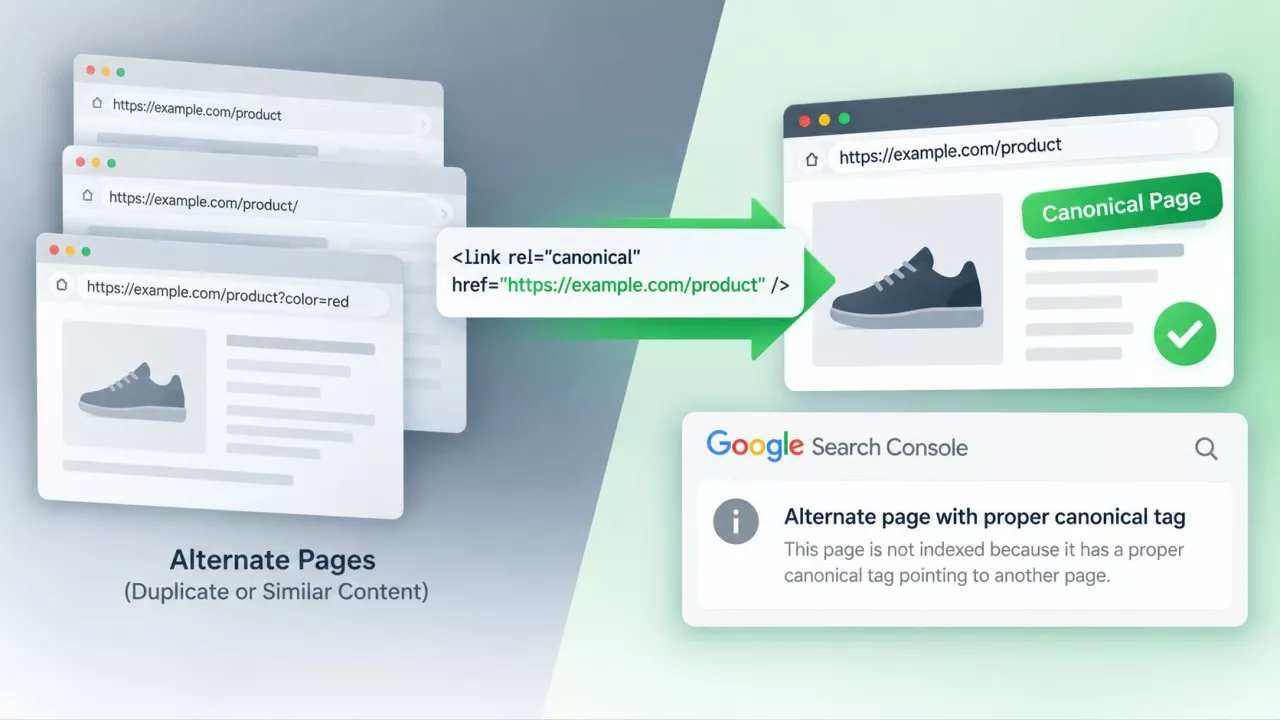
“Alternate page with proper canonical tag” means Google read the canonical tag on that URL, agreed with it, and indexed the page it pointed at instead. Google’s own Page Indexing report help says there is nothing you need to do. The status sits under Not indexed, which is why it reads like a failure.
It is one of the most reported statuses in Search Console and one of the least understood. Shopify and WordPress support forums are full of the same thread: a site owner opens the Pages report, finds several thousand URLs sitting under this heading, and asks how to fix it. The replies usually suggest adding canonical tags, which the site already has. Nobody in those threads gets an answer, because there is no defect to describe.
What does “Alternate page with proper canonical tag” actually mean?
The status means the URL carries a canonical tag pointing at a different page, and Google honoured that tag rather than indexing the URL itself.
Google’s documented definition is narrower than what the report does with it. The help text describes an alternate as an AMP page with a desktop canonical, a mobile version of a desktop canonical, or the desktop version of a mobile canonical. Plenty of sites reporting thousands of these have no AMP and no separate mobile site at all.
What the bucket collects in practice is any URL whose declared canonical points somewhere else that Google went on to index. The word carrying the weight is proper, and it means the tag is well formed and Google accepted it. It does not mean the tag points where you would have wanted.
Is it an error you need to fix?
No, and this is the rare case where Google settles the question outright. According to the Page Indexing report documentation, the page correctly points to the canonical page, which is indexed, so there is nothing you need to do.
Search the status and you get page after page of fix guides for a state Google describes as working. Follow one and you may end up rewriting canonical tags that were doing their job, which is how a tidy report becomes a genuine indexing problem.
The panic is understandable. Opening a report headed “Why pages aren’t indexed” and finding 3,000 of your URLs listed under it does not feel like good news, and no amount of knowing better makes that first look pleasant.
Why does Search Console file it under “Not indexed” then?
Because “Not indexed” in that report is a statement of fact rather than a verdict on the page.
The Pages report is a census of every URL Google knows about on your site, sorted by whether it ended up in the index. A canonical tag doing exactly what you told it to do lands in the same half of that report as a 404 and a 500. That is a filing decision, not a quality judgement, and the distinction only lives in the help text that almost nobody opens.
Which of your pages end up in this bucket?
On a small site, 6 URL types account for nearly all of them:
- Paginated archives - Page 2 and beyond of a blog, category or product listing, when the theme canonicalises them back to page 1.
- Tag and category pages - Archives that duplicate a hub page and get canonicalised to it.
- Filtered and sorted listings - Colour, size and price filters that produce a fresh URL for every combination.
- Tracking parameters - A link somebody shared carrying utm_source that Google found in the wild and crawled.
- Feed, print and AMP versions - Alternate renderings of a page you already publish normally.
- WordPress attachment pages - The separate page WordPress generates for every uploaded image unless a plugin switches it off.
None of those need indexing separately. Seeing them here is the system working.
When is it actually a problem?
This status becomes a real problem when the canonical tag is well formed and aimed at the wrong page, because Search Console cannot tell the two apart.
Pagination is where it bites hardest. If your archive canonicalises /blog/page/3/ to /blog/, every post that only appears on page 3 loses the internal link Google was meant to follow. Google’s pagination guidance is direct about this: don’t use the first page of a paginated sequence as the canonical page, and give each page its own canonical URL instead. Several popular themes still do the opposite, and the report will call the result proper, because structurally it is.
The second thing worth confirming is that the canonical target resolves cleanly. A tag pointing at a URL that redirects, or at one you later set to noindex, leaves Google working out your intent from weaker signals than the one you thought you had given it.
How is it different from “Duplicate, Google chose different canonical than user”?
Alternate page means Google agreed with your canonical tag; duplicate with a different canonical means Google overruled it.
Only the second appears on Google’s list of statuses worth investigating, and it is the one that deserves the attention this one gets. The reason it happens is that a canonical tag was never a command. Google’s canonicalization documentation calls it a strong signal, ranks permanent redirects above it, and weighs sitemap inclusion, an HTTPS preference and hreflang clusters alongside it. When your tag loses an argument, one of those was louder.
Does it waste crawl budget on a small site?
No. According to Google’s crawl budget guide, that advice is written for sites with more than a million unique pages, or more than 10,000 pages whose content changes daily, and it tells everyone else not to read it.
So 400 alternate URLs on a 200-post blog cost you nothing measurable. The number in the report tracks how many URL variations your platform generates, not how much of Google’s attention you are burning through. If your posts are appearing in search within a day or two of publishing, crawling is not your constraint.
How do you check a sample instead of 3,000 URLs?
Export the URL list from the Pages report and audit 20 to 30 of them, chosen across the different URL shapes rather than taken off the top.
The Canonical URL Checker takes a pasted list and reports, per URL, whether the canonical is self-referencing, points elsewhere, is missing, or conflicts with a second tag on the same page. One thing matters in that output: a page you meant to have indexed whose canonical points somewhere you did not intend. Everything else is noise you can close.
Then check the destinations resolve. The Bulk HTTP Status Code Checker runs up to 100 URLs and shows status codes and redirect chains side by side, which turns a canonical aimed at a 301 from invisible into a row on a screen. For one URL at a time, the URL Inspection tool in Search Console shows the canonical you declared next to the one Google selected, and a mismatch there is your answer.
Final Thoughts
Most of the URLs under this status are doing what you built them to do, and the honest fix for the count is to stop looking at the count. Spend the twenty minutes on a sample instead. If every canonical in that sample points where you meant it to, close the report and go and write something.
Frequently Asked Questions
No. Removing it hands the decision to Google, which will still cluster the duplicates and pick one, only now without your input. If you genuinely want a page indexed on its own, give it a self-referencing canonical and content that differs from the page it was pointing at.
Not as itself. The canonical target is the URL Google indexed, so that is the page competing in search results, and any signals the alternate picks up are consolidated into it. Traffic still arrives, just at the address you nominated. That is the intended outcome, not a loss.
It changes the label, not the situation. The URLs move to Excluded by ‘noindex’ tag, which is still in the not-indexed half of the report. Mixing noindex with a canonical pointing elsewhere also sends Google two conflicting instructions, so pick one.
Sometimes. Thousands of alternates on a site with a few hundred real pages usually means filters or parameters are generating URL combinations without limit. That is worth tidying for your own sanity, but it is a platform configuration question rather than an indexing fault.